In this guide, we’ll go through the basics of web development in detail, and show you the essential skills and tools you’ll need to break into the industry. If you decide web development is for you, the next step is to start learning those essential skills, which you can do in this free, online short course designed for beginners.
Here’s what we’ll cover:
- Is now a good time to become a web developer? (2021 update)
- What is web development?
- A brief history of the World Wide Web
- What does a web developer do?
- Programming languages, libraries and frameworks
- What does it take to become a web developer?
Feel free to skip ahead using the clickable menu. Let’s go!
1. What is web development?
Web development is the process of building websites and applications for the internet, or for a private network known as an intranet. Web development is not concerned with the design of a website; rather, it’s all about the coding and programming that powers the website’s functionality.unctionality.
From the most simple, static web pages to social media platforms and apps, from ecommerce websites to content management systems (CMS); all the tools we use via the internet on a daily basis have been built by web developers.
Web development can be broken down into three layers: client-side coding (frontend), server-side coding (backend) and database technology.
Let’s take a look at each of these layers in more detail.
Client-side
Client-side scripting, or frontend development, refers to everything that the end user experiences directly. Client-side code executes in a web browser and directly relates to what people see when they visit a website. Things like layout, fonts, colours, menus and contact forms are all driven by the frontend.
Server-side
Server-side scripting, or backend development, is all about what goes on behind the scenes. The backend is essentially the part of a website that the user doesn’t actually see. It is responsible for storing and organizing data, and ensuring that everything on the client-side runs smoothly. It does this by communicating with the frontend. Whenever something happens on the client-side — say, a user fills out a form — the browser sends a request to the server-side. The server-side “responds” with relevant information in the form of frontend code that the browser can then interpret and display.
Learn more: What’s the difference between frontend and backend?
Database technology
Websites also rely on database technology. The database contains all the files and content that are necessary for a website to function, storing it in such a way that makes it easy to retrieve, organize, edit and save. The database runs on a server, and most websites typically use some form of relational database management system (RDBMS).
To summarize: the frontend, backend and database technology all work together to build and run a fully functional website or application, and these three layers form the foundation of web development.
The difference between web development and web design
You might hear the terms web development and web design used interchangeably, but these are two very different things.
Imagine a web designer and web developer working together to build a car: the developer would take care of all the functional components, like the engine, the wheels and the gears, while the designer would be responsible for both the visual aspects — how the car looks, the layout of the dashboard, the design of the seats — and for the user experience provided by the car, so whether or not it’s a smooth drive.
Web designers design how the website looks and feels. They model the layout of the website, making sure it’s logical, user-friendly and pleasant to use. They consider all the different visual elements: what colour schemes and fonts will be used? What buttons, drop-down menus and scrollbars should be included, and where? What interactive touchpoints does the user interact with to get from point A to B? Web design also considers the information architecture of the website, establishing what content will be included and where it should be placed.
Web design is an extremely broad field, and will often be broken down into more specific roles such as User Experience Design, User Interface Design and Information Architecture.
It is the web developer’s job to take this design and develop it into a live, fully functional website. A frontend developer takes the visual design as provided by the web designer and builds it using coding languages such as HTML, CSS and JavaScript. A backend developer builds the more advanced functionality of the site, such as the checkout function on an ecommerce site.
In short, a web designer is the architect, while the web developer is the builder or engineer.
Learn more: What is the difference between a web developer and a web designer?
3. A brief history of the World Wide Web
The web as we know it today has been decades in the making. To help understand how web development works, let’s go back to where it all started and consider how the internet has evolved over the years.
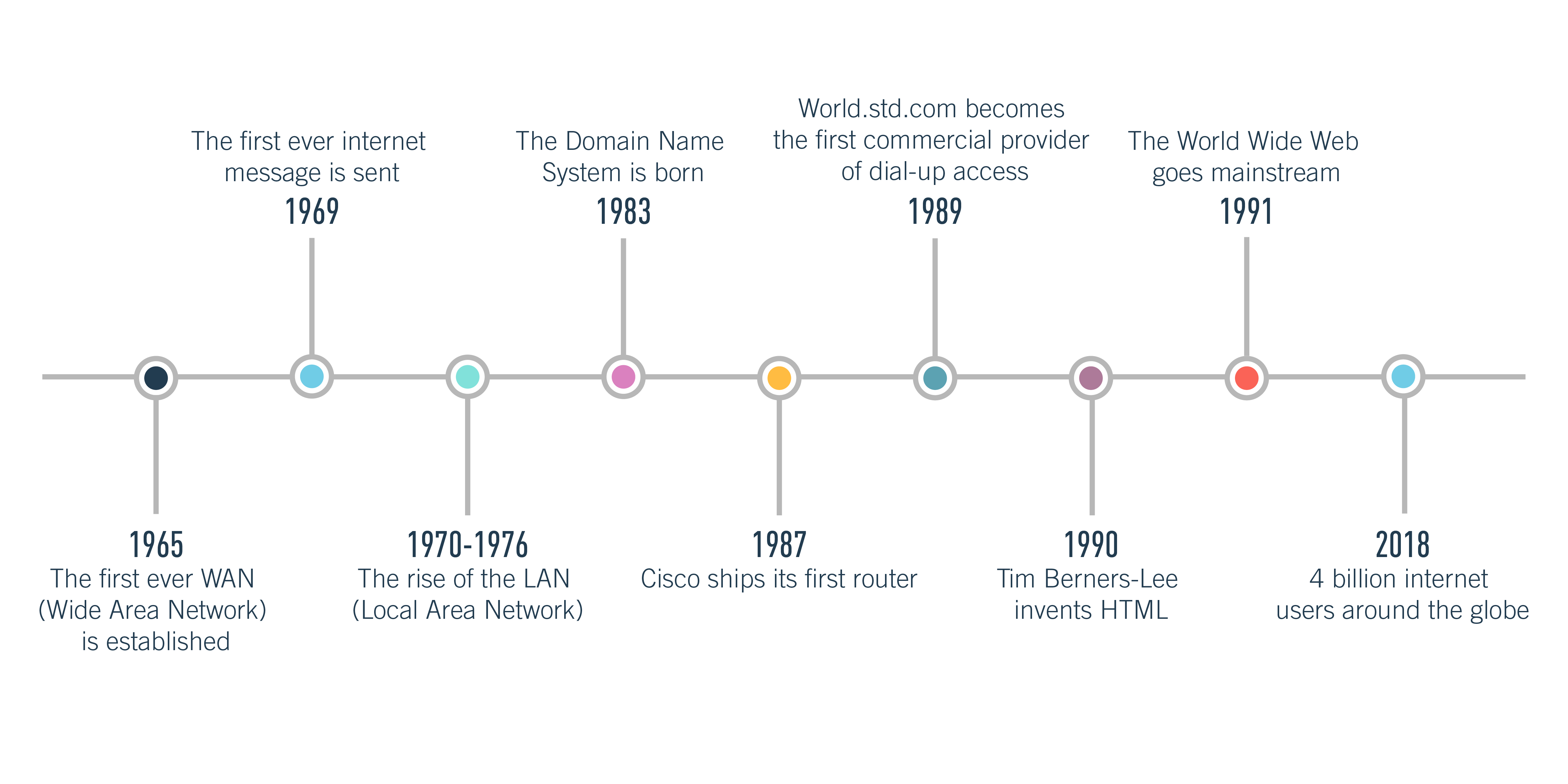
1965: The first WAN (Wide Area Network)
The internet is essentially a network of networks, connecting all different WANs. WAN stands for Wide Area Network, a telecommunications network that spans a large geographical distance. The first WAN was established in 1965 at the Massachusetts Institute of Technology. Later on, this WAN would be known as ARPANET. It was initially funded by the Advanced Research Projects Agency of the US Department of Defense.
1969: The first ever internet message
In October 1969, UCLA student Charley Kline sent the first ever internet message. He tried to send the word “login” to a computer at the Stanford Research Institute via the ARPANET network, but the system crashed after the first two letters. However, about an hour later, the system recovered and the full text was successfully delivered.
1970s: The rise of the LAN (Local Area Network)
The early 70s saw the development of several experimental LAN technologies. LAN stands for Local Area Network, a computer network that connects nearby devices in the same buildings — such as in schools, universities, and libraries. Some notable milestones include the development of Ethernet at Xerox Parc from 1973-1974, and the development of ARCNET in 1976.
1982 - 1989: Transmission Control Protocol (TCP), Internet Protocol (IP), the Domain Name System and Dial-Up Access
In 1982, Transmission Control Protocol (TCP) and Internet Protocol (IP) emerged as the ARPANET protocol, and TCP/IP remains the standard internet protocol today. In 1983, the Domain Name System was established, providing a more user-friendly way of labelling and designating websites (i.e. careerfoundry.com instead of a series of numbers). In 1987, Cisco shipped its first router, and in 1989, World.std.com became the first commercial provider of dial-up internet access.
1990: Tim Berners-Lee and HTML
In 1990, Tim Berners-Lee, a scientist at CERN (the European Organization for Nuclear Research) developed HTML — HyperText Markup Language. HTML became, and still is, a fundamental building block of the internet.
1991: The World Wide Web Goes Mainstream
With the rise of the visual internet browser, the World Wide Web made its way into the mainstream. As of 2018, there are more than 4 billion internet users around the globe.
What does a backend developer do?
The backend is essentially the brains behind the face (the frontend). A backend developer is therefore responsible for building and maintaining the technology needed to power the frontend, consisting of three parts: a server, an application and a database.
The code that backend developers create ensures that everything the frontend developer builds is fully functional, and it is the backend developer’s job to make sure that the server, application and database all communicate with each other. So how do they do this? First, they use server-side languages such as PHP, Ruby, Python and Java to build the application. Then they use tools like MySQL, Oracle and SQL Server to find, save or edit data and deliver it back to the user in frontend code.
What are languages?
In the world of web development, languages are the building blocks that programmers use to create websites, apps and software. There are all different types of languages, including programming languages, markup languages, style sheet languages and database languages.
Programming languages
A programming language is essentially a set of instructions and commands which tell the computer to produce a certain output. Programmers use so-called “high-level” programming languages to write source code. High-level languages use logical words and symbols, making them easy for humans to read and understand. High-level languages can be classified as either compiled or interpreted languages.
C++ and Java, for instance, are compiled high-level languages; they are first saved in a text-based format that is comprehensible for human programmers but not for computers. In order for the computer to run the source code, it needs to be converted to a low-level language; i.e. machine code. Compiled languages tend to be used to create software applications.
Interpreted languages like Perl and PHP do not need to be compiled. Instead, source code written in these languages can be run through an interpreter — a program that reads and executes code. Interpreted languages are generally used for running scripts, such as those used to generate content for dynamic websites.
Low-level languages are those that can be directly recognized by and executed on the computer hardware; they don’t need to be interpreted or translated. Machine language and assembly language are some common examples of low-level languages.
Some of the most popular programming languages of 2018 include Java, C, C++, Python, C#, JavaScript, PHP, Ruby and Perl.
Learn more: A beginner’s guide to the 10 most popular programming languages
Markup languages
Markup languages are used to specify the formatting of a text file. In other words, a markup language tells the software that displays the text how the text should be formatted. Markup languages are completely legible to the human eye — they contain standard words — but the markup tags are not visible in the final output.
The two most popular markup languages are HTML and XML. HTML stands for HyperText Markup Language and is used for the creation of websites. When added to a plain text document, HTML tags describe how this document should be displayed by a web browser. To understand how HTML works, let’s take the example of bold tags. The HTML version would be written as follows:
<b>Make this sentence bold!</b>
When the browser reads this, it knows to display that sentence in bold. This is what the user sees:
Make this sentence bold!
Learn more: What is HTML? A beginner’s guide
XML stands for eXtensible Markup Language. It is a markup language very similar to HTML; however, while HTML was designed to display data with a focus on how it looks, XML was designed purely to store and transport data. Unlike HTML, XML tags are not predefined; rather, they are created by the author of the document. The point of XML is to simplify data sharing and transport, platform changes and data availability, as it provides a software and hardware-independent means of storing, transporting and sharing data. You can learn more about XML and how it works here.
Style sheet languages
A style sheet is basically a set of stylistic rules. Style sheet languages are used, quite literally, to style documents that are written in markup languages.
Consider a document written in HTML and styled using CSS (Cascading Style Sheets), a style sheet language. The HTML is responsible for the content and structure of the web page, while CSS determines how this content should be presented visually. CSS can be used to add colours, change fonts, insert backgrounds and borders, as well as to style forms. CSS is also used to optimize web pages for responsive design, ensuring they adapt their layout to whatever device the user is on.
Learn more: What is CSS?
Database languages
Languages are not only used for building websites, software and apps; they are also used to create and manage databases.
Databases are used to store huge volumes of data. The Spotify music app, for example, uses databases to store music files, as well as data about the user’s listening preferences. Likewise, social media apps like Instagram use databases to store user profile information; every time a user updates their profile in some way, the app’s database will also update.
Databases are not designed to understand the same languages that apps are programmed in, so it’s essential to have a language that they do understand — like SQL, the standard language for accessing and manipulating relational databases. SQL stands for Structured Query Language. It has its own markup, and basically enables programmers to work with the data held in a database system.
What are libraries and frameworks?
Web developers also work with libraries and frameworks. Despite much confusion, they are not the same thing — although they are both there to make the developer’s job easier.
Libraries and frameworks are essentially sets of prewritten code, but libraries are smaller and tend to be used for more specific use-cases. A library contains a collection of useful code, grouped together to be reused later. The purpose of a library is to enable developers to reach the same end goal while writing less code to get there.
Let’s take the example of JavaScript, the language, and jQuery, a JavaScript library. Rather than writing, say, ten lines of code in JavaScript, the developer can take the condensed, prewritten version from the jQuery library — saving time and effort.
Learn more: JavaScript vs. jQuery — What’s the difference?
A framework contains ready-made components and tools that enable the developer to write code faster, and many frameworks also contain libraries. It gives the developer a structure to work from, and the framework you choose to work with will largely dictate the way you build your website or app, so choosing a framework is a big decision. Some popular frameworks include Bootstrap, Rails and Angular.
The easiest way to understand libraries and frameworks is to imagine you are building a house. The framework provides the foundation and the structure, as well as instructions or guidelines for completing certain tasks. Say you want to install an oven in your new home: you could buy the separate components and build the oven from scratch, or you could pick a ready-made oven from the store. Just like building a website, you can write the code from scratch or you can take pre-written code from a library and simply insert it.
Learn more: Should I learn Ruby on Rails?
Web developers will also use a text editor, such as Atom, Sublime or Visual Studio Code, to write their code; a web browser, such as Chrome or Firefox; and an extremely crucial tool: Git!
Git is a version control system where developers can store and manage their code. As a web developer, it’s inevitable that you’ll make constant changes to your code, so a tool like Git that enables you to track these changes and reverse them if necessary is extremely valuable. Git also makes it easier to work with other teams and to manage multiple projects at once. Git has become such a staple in the world of web development that it’s now considered really bad practice not to use it.
Another extremely popular tool is GitHub, a cloud interface for Git. GitHub offers all the version control functionality of Git, but also comes with its own features such as bug tracking, task management and project wikis. GitHub not only hosts repositories; it also provides developers with a comprehensive toolset, making it easier to follow best practices for coding. It is considered the place to be for open-source projects, and also provides a platform for web developers to showcase their skills. You can learn more about the importance of GitHub here.
Create by: web_developers1_community (visit my profile & follow me)


Comments
Post a Comment
If you have any doubts, Please let me know.